

SUMMARY:
Database administrators must regularly execute the PostgreSQL ANALYZE command to collect essential table statistics, enabling the query planner to determine the most efficient execution paths for complex database queries.
- The ANALYZE command scans a lightweight subset of table rows to store detailed data distribution metrics, such as distinct values and null fractions, within the pg_statistic system catalog.
- The PostgreSQL query planner relies heavily on these collected statistics to accurately estimate row counts and select optimal join strategies or scan methods.
- Database administrators can fine-tune the default_statistics_target parameter on specific columns to capture more detailed data samples for highly skewed or non-uniform information.
Maintain optimal database performance and prevent inefficient query execution by scheduling regular ANALYZE operations, especially following significant data loads or deletions.
Table of contents
Introduction
PostgreSQL’s query planner is only as smart as the data it knows about. Every time you run ANALYZE, PostgreSQL collects statistical information about the contents of your tables, which becomes the foundation for efficient query planning. Without accurate statistics, even a well-tuned database can perform poorly because the planner will make incorrect assumptions about row counts, data distribution, and join selectivity.
What ANALYZE Does
The ANALYZE command scans a sample of table rows and stores summarized statistics in the system catalog pg_statistic. These statistics include information such as:
- Number of distinct values per column
- Fraction of nulls
- Most common values (MCVs)
- Histograms showing data distribution
By default, ANALYZE samples only a subset of rows, not the entire table. This makes it lightweight and fast enough to run regularly as part of autovacuum, ensuring the planner always works with fresh information.
How PostgreSQL Uses These Statistics
When you execute a query, PostgreSQL estimates how many rows each filter or join condition will return. For example, a filter on a column with only a few unique values will likely use a bitmap or sequential scan, while one with many distinct values may favor an index scan. The better PostgreSQL understands data distribution, the more accurate these cost estimates will be.
Inaccurate or outdated statistics can cause inefficient plans, such as unnecessary nested loops or sequential scans on large tables. This is why regular ANALYZE runs are crucial, especially after large data loads or deletes.
The Role of the Default Statistics Target
The default_statistics_target parameter determines how detailed PostgreSQL’s collected statistics are. The higher the target, the more sample data is analyzed and the more accurate the histograms and MCVs become – at the cost of slightly longer analyze times and more catalog storage.
For most workloads, the default value of 100 offers a good balance. However, for columns with highly skewed data or non-uniform distributions (such as status codes or geographic regions), you can fine-tune this per column:
ALTER TABLE orders ALTER COLUMN region SET STATISTICS 500;
ANALYZE orders;
This tells PostgreSQL to collect more detailed statistics for that column, improving estimates for queries that depend on it.
Peeking into pg_statistic: How PostgreSQL Sees Your Data
You can view what PostgreSQL learned about your data using:
SELECT attname, stadistinct, stanullfrac
FROM pg_statistic s
JOIN pg_attribute a
  ON a.attnum = s.staattnum AND a.attrelid = s.starelid
WHERE a.attrelid = 'orders'::regclass;

-- Replace 'orders' with your 'table_name'
Sample output:
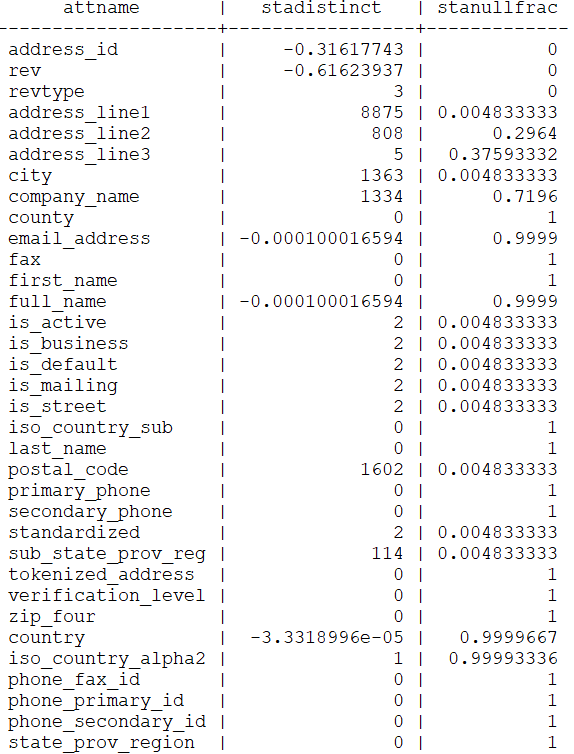
This reveals how PostgreSQL perceives each column:
- stadistinct – estimated number of distinct non-null values.
- A positive number (e.g., 8875) is the actual count.
- A negative number (e.g., -0.31617743) means a fraction of the total rows are distinct (31.6% in this case).
- stanullfrac – fraction of null values (0 = none, 1 = all nulls).
For instance, if revtype has stadistinct = 3 and stanullfrac = 0, PostgreSQL knows it contains only three unique values and no nulls. If company_name shows stanullfrac = 0.72, 72% of rows are null – a critical factor in how the planner chooses join or filter strategies.
Why It Matters
ANALYZE isn’t just a maintenance command; it directly shapes performance. Fresh and detailed statistics empower PostgreSQL to pick the best access paths, join orders, and scan methods. When performance dips after data churn, running a manual ANALYZE often restores optimal query plans instantly.
Final Thoughts
Understanding and monitoring what ANALYZE collects – and adjusting the statistics target for complex columns – gives DBAs greater control over performance stability. PostgreSQL’s planner decisions are only as reliable as the statistics behind them.
If you need our team to handle database maintenance, health checks, and tuning for your PostgreSQL environments, feel free to reach out – we ensure your systems always operate with accurate statistics and optimal performance.