

Summary
pgbench, PostgreSQL’s built-in benchmarking tool, enables organizations to accurately measure the impact of hardware upgrades by simulating realistic workloads to compare transactions per second (TPS) and latency before and after infrastructure changes.
- Establishing a Baseline: The utility allows administrators to initialize a test dataset and simulate concurrent clients, creating a reliable performance baseline without risking interference with live production data.
- Validating Hardware Gains: In a documented case study, upgrading a server from 4 CPUs and 8 GB RAM to 8 CPUs and 16 GB RAM resulted in nearly doubled throughput and significantly reduced latency.
- Tuning for Optimization: Hardware upgrades alone are insufficient; administrators must also tune critical PostgreSQL parameters such as shared_buffers, work_mem, and wal_buffers to ensure the software utilizes the expanded system resources effectively.
By systematically benchmarking with pgbench and refining database configurations, businesses can validate their infrastructure investments and ensure optimal performance.
Table of contents
Introduction
Upgrading PostgreSQL hardware is a common approach to improving database performance, but it is essential to quantify the impact. pgbench, PostgreSQL’s built-in benchmarking tool, allows organizations to simulate workloads and evaluate performance metrics before and after upgrades. In this blog, we explore a scenario where a client moves from a server with 4 CPUs and 8 GB RAM to a more powerful setup with 8 CPUs and 16 GB RAM, highlighting how pgbench can help measure improvements and guide optimization.
What is pgbench?
pgbench is a versatile benchmarking utility that comes with the PostgreSQL contrib module. It can simulate multiple concurrent clients performing transactions on the database. Its key benefits include:
- Measuring transactions per second (TPS) to evaluate throughput.
- Simulating read-only, write-only, or mixed workloads.
- Supporting multiple concurrent clients for realistic load testing.
- Allowing initialization with custom scale factors to simulate larger datasets.
Preparing for Benchmarking
To achieve accurate and reliable results, it is important to set up a dedicated test environment. Production data should not be used for benchmarking to avoid interference. PostgreSQL should be configured appropriately with reasonable memory and connection settings. To initialize pgbench:
pgbench -i -s 50 mydbHere, -i initializes the database and -s 50 sets the scale factor, determining the database size for testing.
Benchmark parameters such as the number of concurrent clients (-c) and transactions per client (-t) should reflect real-world workloads.
Benchmarking Before Upgrade
On the existing server with 4 CPUs and 8 GB RAM, a typical test might be:
pgbench -c 10 -t 1000 mydbExample results:
starting vacuum...end.
transaction type: <builtin: TPC-B (sort of)>
scaling factor: 1
query mode: simple
number of clients: 10
number of threads: 1
number of transactions per client: 1000
number of transactions actually processed: 10000/10000
latency average = 6.7 ms
initial connection time = 20.123 ms
tps = 1500.532123 (including connections establishing)
tps = 1502.421342 (excluding connections establishing)| Metric | Value |
| Transactions per Second (TPS) | 1500 |
| Average Latency per Transaction | 6.7 ms |
This baseline shows how the database performs under moderate load with the current hardware.
Benchmarking After Upgrade
After moving to 8 CPUs and 16 GB RAM, the same test can be repeated:
pgbench -c 10 -t 1000 mydbExample results:
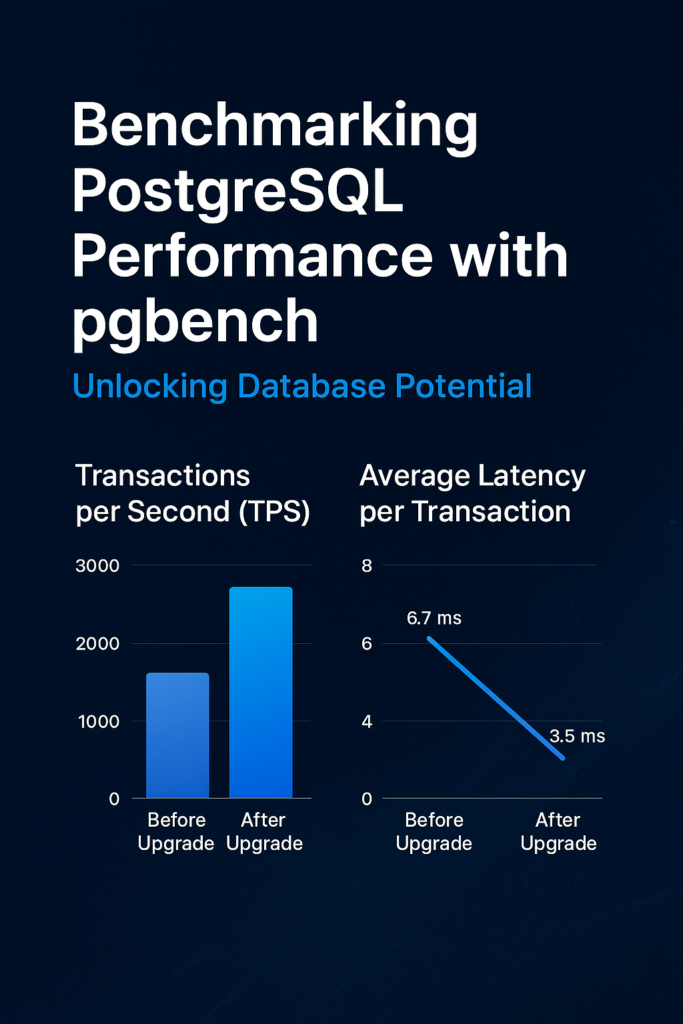
| Metric | Before Upgrade | After Upgrade |
| Transactions per Second (TPS) | 1500 | 2800 |
| Average Latency per Transaction | 6.7 ms | 3.5 ms |
The upgraded server nearly doubles throughput and significantly reduces latency, demonstrating the benefits of increased CPU cores and memory.
Performance Depends on Multiple Factors
Hardware alone does not guarantee improved performance. PostgreSQL must be tuned appropriately to leverage additional resources:
- Memory Parameters
- shared_buffers for caching frequently accessed data.
- work_mem for sorts and joins to reduce disk I/O.
- maintenance_work_mem for maintenance tasks like VACUUM and CREATE INDEX.
- Parallelism Settings
- Settings such as max_parallel_workers_per_gather influence CPU utilization for queries.
- Settings such as max_parallel_workers_per_gather influence CPU utilization for queries.
- Disk and WAL Configuration
- Optimizing wal_buffers and checkpoint parameters ensures faster write operations.
- Optimizing wal_buffers and checkpoint parameters ensures faster write operations.
- Connection and Workload Design
- The number of concurrent clients and the number of transaction types affect CPU utilization. pgbench helps simulate these scenarios accurately.
- The number of concurrent clients and the number of transaction types affect CPU utilization. pgbench helps simulate these scenarios accurately.
- Vacuum and Autovacuum
- Regular vacuuming prevents table bloat, ensuring performance gains are not offset.
Conclusion
Using pgbench, organizations can confidently measure PostgreSQL performance before and after hardware upgrades. In this scenario, upgrading from 4 CPUs and 8 GB RAM to 8 CPUs and 16 GB RAM nearly doubled transaction throughput and reduced latency. However, actual gains depend on properly tuned memory, parallelism, and maintenance settings. By combining benchmarking with configuration optimization, organizations can ensure that PostgreSQL fully leverages hardware improvements for maximum performance.
Check out more PostgreSQL blogs.
Contact us for questions.