
SUMMARY:
Oracle Cloud Infrastructure (OCI) lets database administrators patch Oracle databases safely and with minimal downtime by combining automated pre-checks, rolling updates, and structured post-patch validation into the OCI Database Service.
Key Takeaways:
- OCI groups database patching into distinct layers—operating system, database binaries, Grid Infrastructure, cloud tooling, and interim fixes—so DBAs know exactly which component each update targets.
- Administrators must complete critical prerequisites before patching, including verifying OCI permissions, allocating at least 15 GB of free space in the /u01 directory, confirming Clusterware is running, and testing patches on a non-production clone.
- DBAs apply patches through the OCI console by running a pre-check, applying the update, and monitoring each work request, then validate success by checking the database version, patch registry, listener status, and any invalid objects.
- OCI supports rolling back a failed or unwanted patch directly from the console, though the database may briefly become inaccessible during the operation.
Consistent, well-planned patching on OCI is a strategic investment in database security and stability, so pair the platform’s automation with disciplined backups and rigorous verification to keep enterprise workloads resilient and compliant.
Database version: 19c
Patch RU: This is applicable to any RU
Table of contents
Introduction
Database patching is one of the most critical responsibilities in modern database administration, ensuring system security, stability, and optimal performance. As threats evolve and databases grow in complexity, timely patching becomes essential to safeguard data, maintain compliance, and reduce the risk of system vulnerabilities. Oracle Cloud Infrastructure (OCI) significantly streamlines this process by integrating automated patching capabilities into the OCI Database Service, allowing DBAs to plan, execute, and validate patches with greater confidence and minimal downtime.
Key Components of Database Patching
- Operating System Patches — Security and kernel updates for VMDB/BMDB hosts.
- Database Patching — RU and one-off patches applied to Oracle binaries and databases.
- Grid Infrastructure Patching — Updates to Clusterware, ASM, and related components.
- Cloud Tooling Patching — Updates to dbcli and DBaaSCLI utilities.
- Interim Patches — One-off fixes for specific bugs, later rolled into future RUs.
Important Points Regarding Database Patching
- We can apply patches using console or cli.
- Requires reboot and so need to plan for downtime.
- Implement High availability to minimize downtime.
- Backup the database before applying the patch.
- Patch the DB system node before and then the databases.
Prerequisites for Safe Patching
Before starting, ensure your environment meets these requirements to avoid failures:
- Access and Permissions: Your OCI user must have policies that allow Database Service operations (e.g., managing database families).
- Storage and Connectivity: The DB system needs access to OCI Object Storage via a service gateway. Allocate at least 15 GB of free space in the /u01 directory on database hosts.
- System Health: Oracle Clusterware must be running, and all DB system nodes must be operational.
- Backup and Testing: Create full backups of your databases and test patches on a non-production clone.
- Supported Versions: Check available updates — e.g., for Oracle Database 19c, up to four recent RUs.
Note: This blog post covers the steps to apply a patch on VMDB/BMDB databases using the console and dbcli.
Steps To Apply Patch Using Console
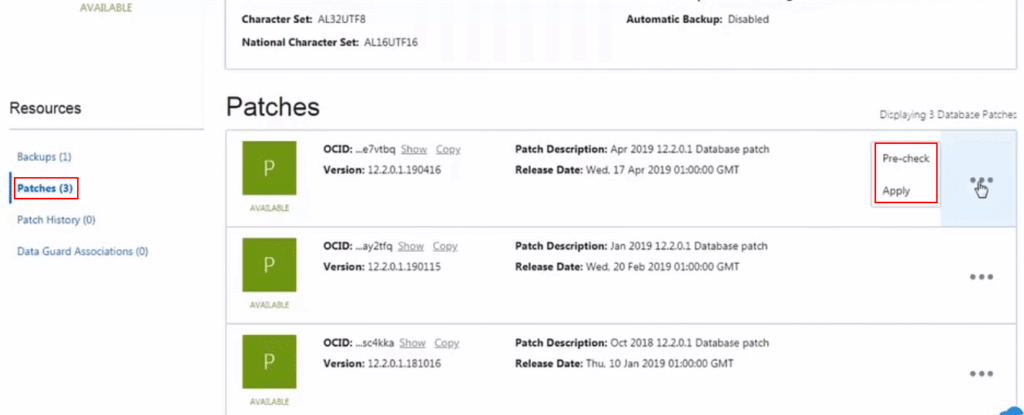
Navigate to the DB system created using the console. Under resources, click patches. Click the three dots next to the available patch.
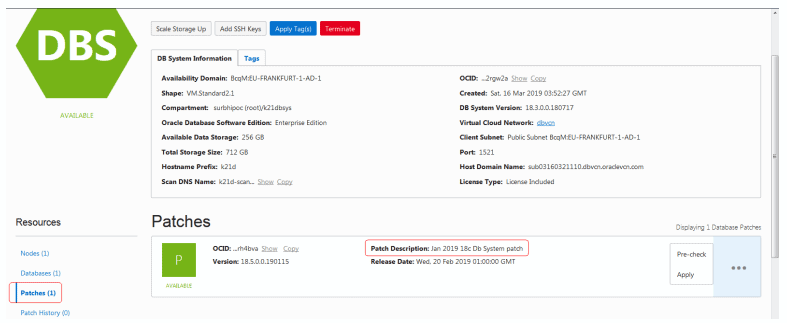
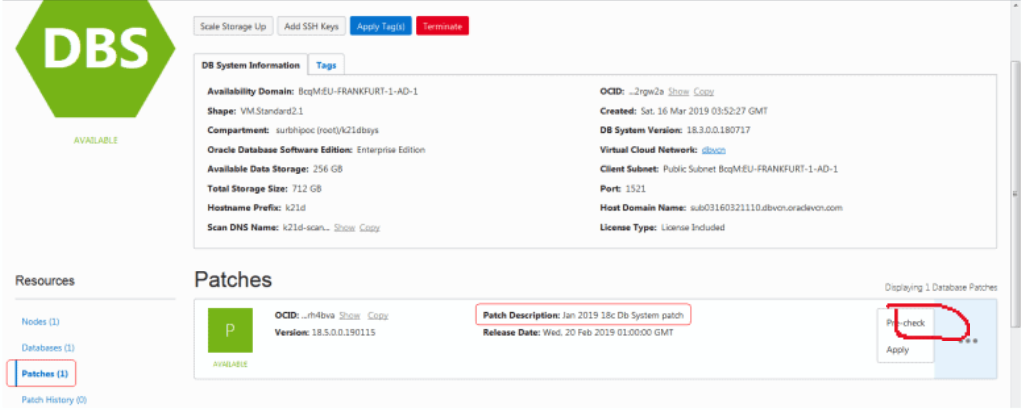
Now we can pre-check it, and if the pre-check succeeds, we can go ahead and apply the patch.
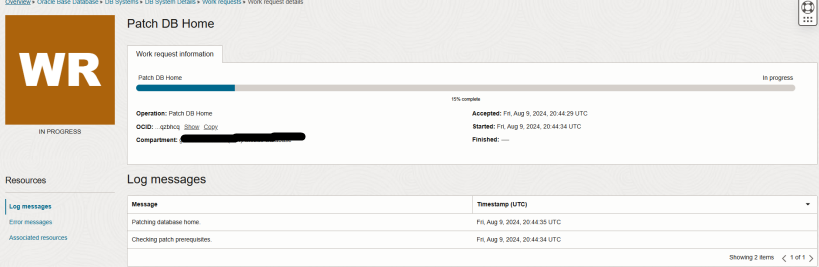
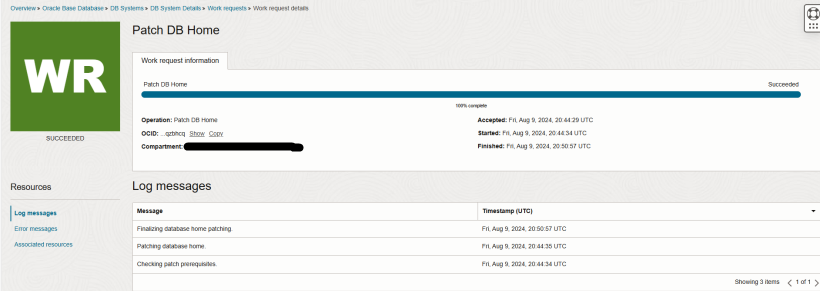
Monitor the work request for the patch pre-check.
To apply a Database patch, click databases under resources in DB System details, then under database resources, click patches.
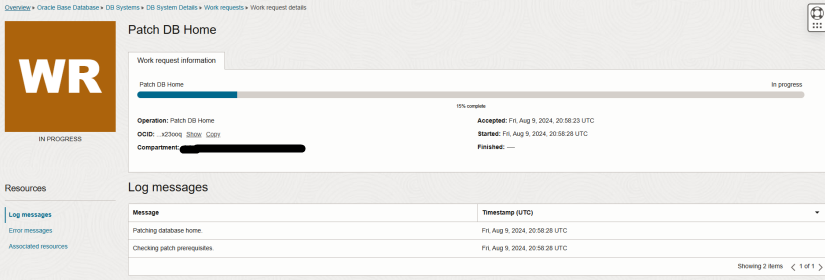
Monitor the work request for applying the patch.
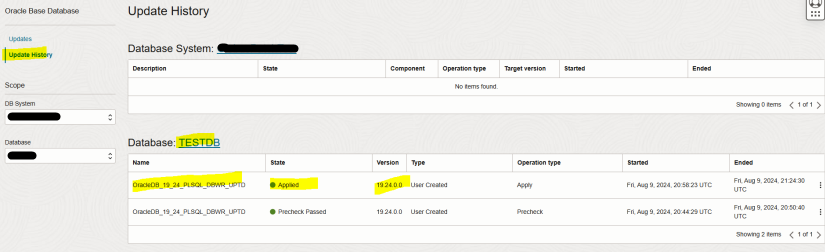
Verify the patch status in the update history once the patch completes.
Post-Patch Database Validation Steps
After patching, verify:
- Database Version
SELECT * FROM v$version;- Patch Information
SELECT * FROM dba_registry_sqlpatch ORDER BY action_time DESC;- Listener and Services
lsnrctl status- Invalid Objects
SELECT owner, object_name, object_type FROM dba_objects WHERE status='INVALID';Rolling Back a Patch
Verify the patch status in the update history once the patch completes.
To roll back the last patch or failed patch attempt by using the Oracle Database Cloud Service console:
Go to the Patching page of the database deployment on which you want to roll back a patch:
- Open the Oracle Database Cloud Service console.
- Click the database deployment on which you want to roll back a patch. The Oracle Database Cloud Service Overview page is displayed.
- Click the Administration tile and then click the Patching tab. The Oracle Database Cloud Service Patching page is displayed.
Click Rollback. The Patching page redisplays, showing a status message that your request has been submitted; the Administration tile shows the start time of the rollback operation; and a Rolling back… message replaces the Rollback button.
Note: Rollback operations are performed with a minimum of impact on the functioning of the database. However, during a patch rollback operation the database may be shut down for a short period of time, thus making it inaccessible.
Conclusion
Patching Oracle databases on OCI is significantly simplified by the platform’s built-in automation, lifecycle management tools, and strong integration between DB system components. However, effective patching still requires strategic planning, careful validation, and rigorous post-patch verification. By performing complete pre-patch checks, securing backups, validating Data Guard/RAC configurations, and monitoring all logs and work requests during patching, DBAs can confidently apply updates with minimal downtime and reduced risk.
OCI’s robust patching framework ensures that environments remain secure, compliant, and optimized for performance while reducing the complexity traditionally associated with on-premises patching. Consistent and structured patching not only strengthens system resilience but also enhances the long-term stability and agility of enterprise workloads. With a disciplined approach and OCI’s cloud-native capabilities, database administrators can streamline patch cycles and maintain a highly reliable operational environment.