
SUMMARY:
Oracle Cloud Infrastructure (OCI) Database Management gives DBAs a single, cloud-native platform to monitor, diagnose, and administer Oracle databases, and enabling it requires configuring a monitoring user, securing credentials in OCI Vault, setting IAM policies, establishing private network connectivity, and validating the service through Performance Hub.
Key Takeaways:
- OCI Database Management centralizes fleet-wide monitoring, performance diagnostics, SQL and ASH analytics, and administrative automation across VM, Bare Metal, Exadata, and on-premises Oracle environments.
- Administrators must grant specific privileges to a monitoring user such as DBSNMP and set a FIPS-compliant password of 14 to 127 characters, since a non-compliant password causes enablement to fail.
- The setup requires storing the DBSNMP password as a secret in OCI Vault, creating IAM policies for both the service and the user group, and building a Private Endpoint in your VCN with matching ingress and egress security rules.
- You choose between Full Management, a paid tier that unlocks all Enterprise Edition features, and Basic Management, which delivers 14 core metrics plus ASH Analytics and SQL Monitoring for CDBs.
Follow these steps in sequence to achieve real-time database visibility and proactive diagnostics, and verify success by confirming that metrics populate and Performance Hub loads without privilege errors.
Table of contents
- SUMMARY:
- Introduction
- What is OCI Database Management?
- Prerequisites
- Configure the Monitoring User
- Store the Password in OCI Vault
- Create IAM Policy for Database Management Service
- Create IAM Policy for the User or Group
- Network Configuration
- Enable Database Management
- Post-Enablement Validation
- Key Considerations
- Conclusion
Introduction
Oracle Cloud Infrastructure (OCI) Database Management provides a centralized platform for monitoring, diagnosing, and administering Oracle databases across cloud and on-premises environments. It enables DBAs to gain deep insights into performance, resource utilization, and operational health without relying on multiple tools.
Whether you are managing a single database or an enterprise-wide fleet, OCI Database Management simplifies monitoring, enhances diagnostics, and improves overall database reliability.
This article walks through the steps required to enable Database Management for Oracle databases running in OCI.
What is OCI Database Management?
OCI Database Management is a cloud-native service that delivers:
- Fleet-wide database monitoring
- Performance diagnostics and tuning insights
- SQL monitoring and ASH analytics
- Tablespace and parameter management
- Job scheduling and administrative automation
It supports Oracle databases running on:
- Virtual Machine DB Systems
- Bare Metal DB Systems
- Exadata Cloud Service
- On-premises environments (via Management Agent)
Prerequisites
Before enabling Database Management, ensure the following:
- Oracle Database running on OCI
- Access to OCI Console
- OCI Vault available for credential storage
- Required IAM permissions for users and services
Configure the Monitoring User
Database Management requires a monitoring user such as DBSNMP with specific privileges.
Run the following SQL commands:
GRANT CREATE PROCEDURE TO dbsnmp;
GRANT SELECT ANY DICTIONARY, SELECT_CATALOG_ROLE TO dbsnmp;
GRANT ALTER SYSTEM TO dbsnmp;
GRANT ADVISOR TO dbsnmp;
GRANT EXECUTE ON DBMS_WORKLOAD_REPOSITORY TO dbsnmp;
Unlock the account and set a strong password:
The level of password checks in the Database Management service is different from that in the database. For the Database Management service, the user password must be FIPS-compliant, following these rules:
- Password length must be between 14 to 127 characters.
- Password must include at least one digit, one lowercase letter, one uppercase letter, and one special character.
The database’s own verification might have stricter rules at some points, e.g., requiring at least two digits, two lowercase, two uppercase, and two special characters.
ALTER USER dbsnmp ACCOUNT UNLOCK;
ALTER USER dbsnmp IDENTIFIED BY "Strong_FIPS_Compliant_Password";
Store the Password in OCI Vault
Search for the Vault service in Identity & Security.

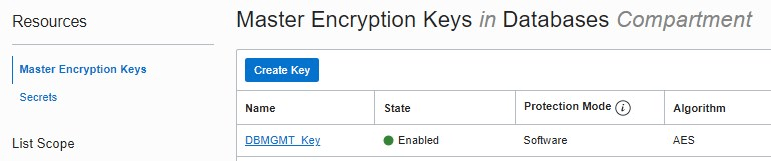
Create a new Vault if needed. Within your Vault, create a key to encrypt the user’s password.
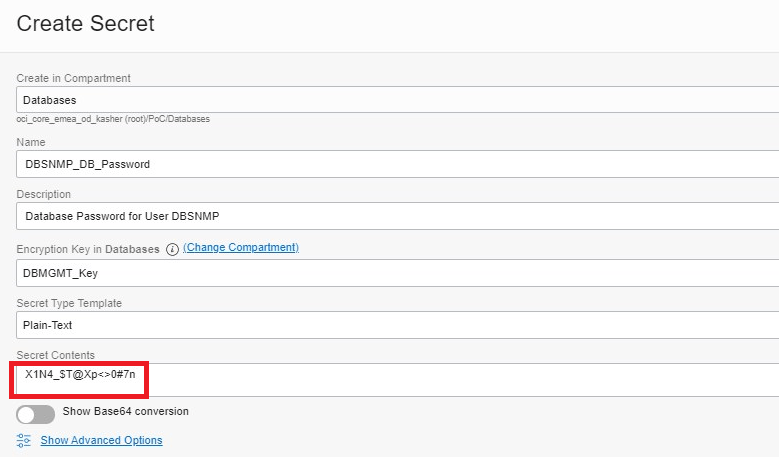
Create a Secret and store the DBSNMP password.
Create IAM Policy for Database Management Service
The Database Management service requires permission to:
- Read secrets from Vault
- Write job outputs to Object Storage
Example policy:
Allow service dpd to read secret-family in compartment <compartment_name>
Allow service dpd to manage objects in compartment <compartment_name>
Create IAM Policy for the User or Group
The user enabling Database Management must have the appropriate permissions.
Example policy:
Allow group DB-MGMT-ADMIN to manage dbmgmt-family in compartment <compartment_name>
Allow group DB-MGMT-ADMIN to read database-family in compartment <compartment_name>
Allow group DB-MGMT-ADMIN to manage vnics in compartment <compartment_name>
Allow group DB-MGMT-ADMIN to use subnets in compartment <compartment_name>
Allow group DB-MGMT-ADMIN to manage secret-family in compartment
Network Configuration
Create a Private Endpoint in Your VCN
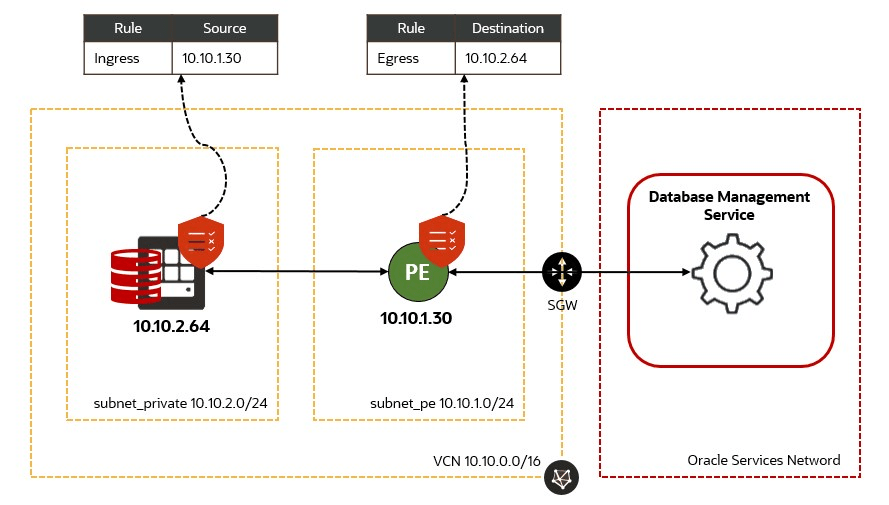
The Database Management service resides in an Oracle-managed tenancy and interacts with your cloud databases via a Private Endpoint that is created within your VCN. The Private Endpoint does not need to be in the same subnet as your cloud databases but must be on a subnet that allows communication with them.
Search for the Administration service in Database Management.
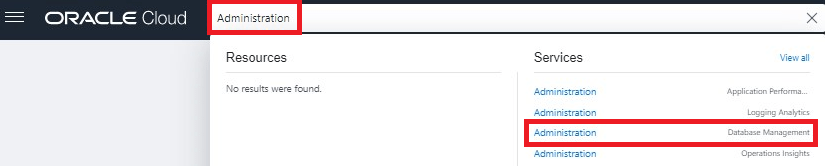
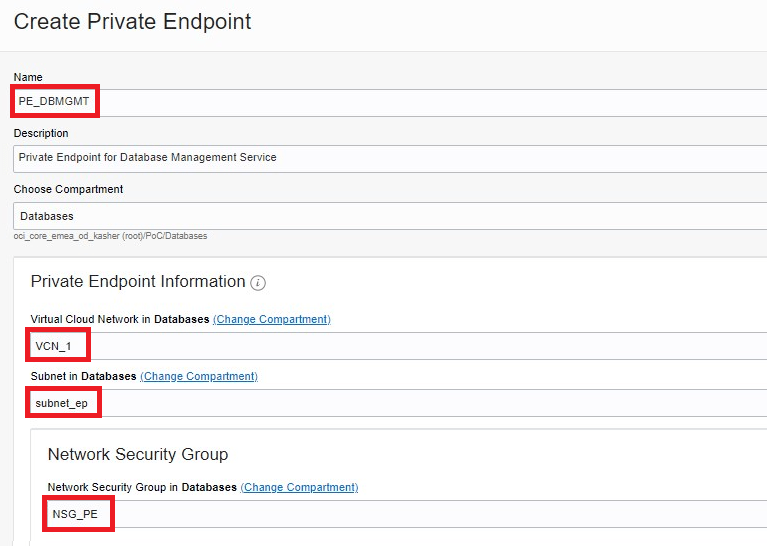
Click on the Private Endpoints link, then Create Private Endpoint. Name your Private Endpoint, choose a compartment, select a VCN, a subnet, and a Network Security Group. Finally, click Create Private Endpoint.
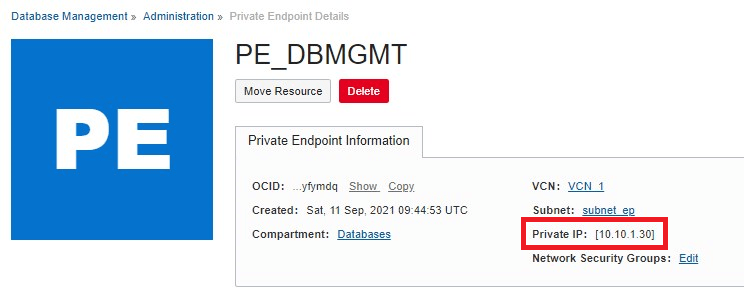
A private IP address will be assigned to your Private Endpoint.
Allow Network Traffic Between the Private Endpoint and Your Cloud Databases
Add the appropriate ingress and egress security rules to your Security Lists or Network Security Groups to enable the Database Management service to communicate with your cloud databases via the Private Endpoint. For RAC databases, use the SCAN IPs for communicating with the Database Management service.
Add stateful security rules as follows:
- In the Network Security Group for your VM DB System, add the private IP address of the Private Endpoint to the Ingress Rules so your database can receive traffic from the Database Management service.
- In the Network Security Group for the Private Endpoint, add the VM DB System’s private IP to the Egress Rules so the Database Management service can send requests to the database.
Enable Database Management
Enable Database Management for Your Cloud Database
When you enable Database Management, you can select the full or basic management option:
- Full Management: includes all database management features for EE. The Performance Hub features are not available for SE.
- Basic Management: includes 14 basic monitoring metrics such as CPUUtilization and StorageAllocated. It also includes ASH Analytics and SQL Monitoring features in Performance Hub for CDBs, but not for PDBs.
From the Database Details page, click on the Enable link for Database Management in the Associated Services section.
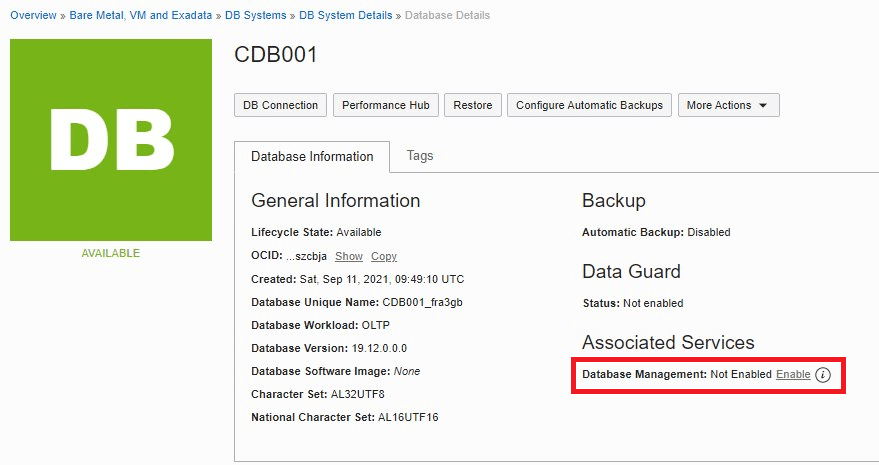
Enter the database username DBSNMP, choose the Secret created in Step 2, choose the Private Endpoint created in Step 5, and click the Enable Database Management button.
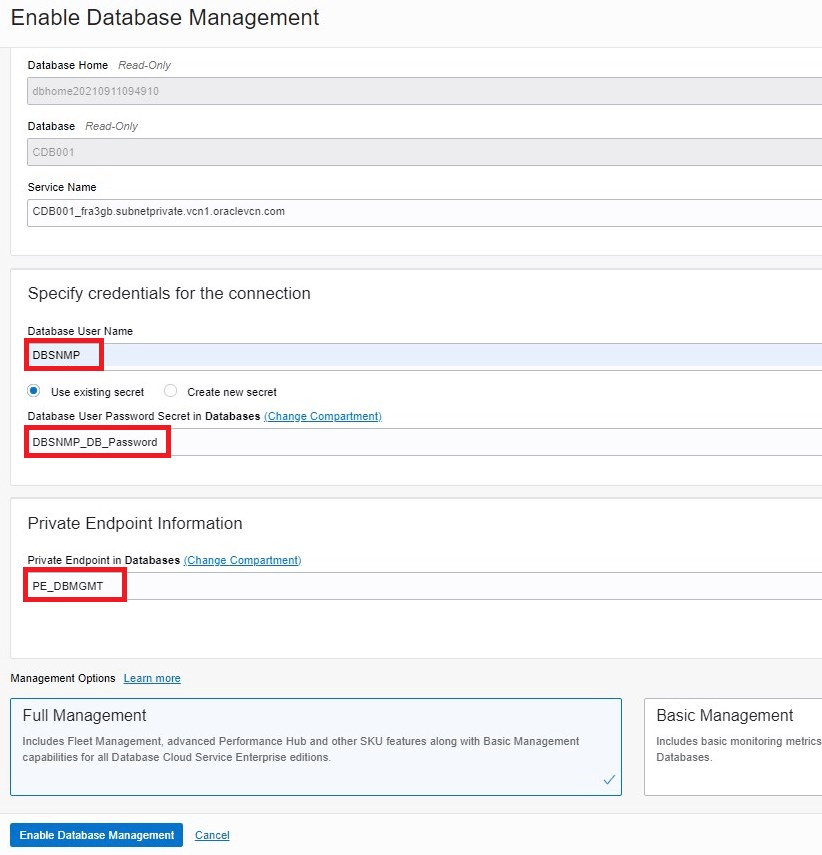
If the user’s password was not FIPS-compliant, enabling will fail. Make sure you create a FIPS-compliant password for your DBSNMP user and save it in the OCI Vault Secret.
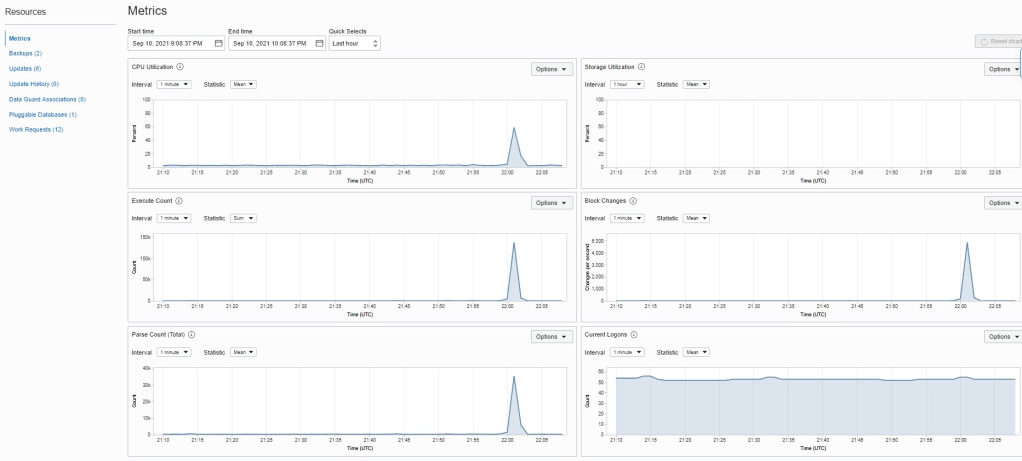
Once the enabling process successfully completes, you’ll see the metrics on the Metric page.
Post-Enablement Validation
After enabling the service:
Verify that metrics are populating.
Open Performance Hub to view:
- ASH Analytics
- SQL Monitoring
- Blocking sessions
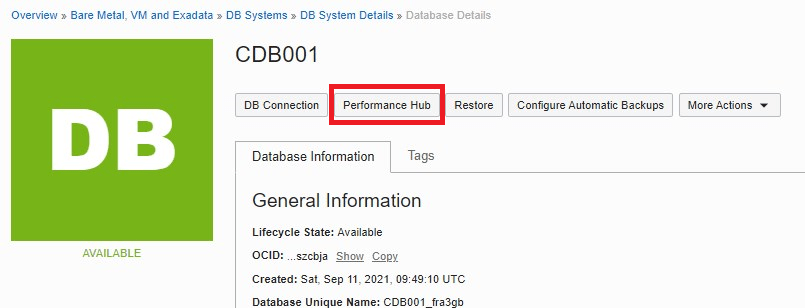
If your database user is missing any required privileges, Performance Hub will display an error message in the upper-right corner of the page.
Key Considerations
- Database Management supports the monitoring of RAC databases.
- In Data Guard environments, Database Management can be enabled for both primary and standby databases.
- You must disable Database Management before you can terminate the VM DB System.
- Cross-region monitoring and management of Oracle databases is not yet available.
- Full Management is a paid feature.
Conclusion
OCI Database Management provides a unified, secure, and scalable solution for monitoring and administering Oracle databases. By enabling this service, organizations gain real-time visibility into database performance, proactive diagnostics, and centralized management capabilities.
Following the steps outlined above ensures a smooth configuration process, allowing DBAs to take full advantage of OCI’s built-in database management tools.